Block Chess Websites on Chrome, Desktop and the Web
How to block Chess Websites on Chrome, Desktop, and the Web
Sometimes you don't want to block a website all the time, just during certain hours when you need to focus. That's where Scheduled Blocks come in.
Features in Scheduled Blocks
Block entire websites
Block only specifc URLs of a website
Customize when and what time to block
Blocking Chess Websites during specific hours with Scheduled Blocking
With Otto's Scheduled Block Feature you can block websites during specfic hours, customize which days for the blocks to trigger. Set it up once and it runs forever.
You can add upto 2 websites to block on the free plan
 on your tool bar.
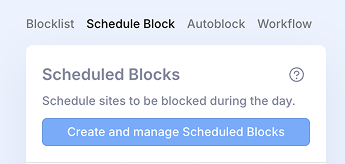 then click the "Create and Manage scheduled blocks"
Select Chess Websites from presets or manually add a URL chess.com
Edit the schedule to set time slots and days
Click Save to activate your rule

Otto works really well for its intended purpose, and it's helping me fight my internet addiction and make better use of my time. The UI is very simple and clean, and the illustrations are adorable. It's very helpful all around!
— Hannah
Simple but effective. Easy to customise, nice passive incentives. It does exactly what you're asking of it and it does it well.
— Uriel
After using this for a couple months, I really don't have anything negative to say about it. Otto does exactly what it is designed to do, block distractions and help you be more productive. Even without the upgrade, it still works well to boost productivity.
— Joel
Simple, reliable focus tool. I've used it long-term for blocking distracting sites and timeboxing work. It does exactly what it promises without unnecessary complexity. Solid option if you want fewer decisions and more follow-through.
— Kevin
Other Websites
to Block
Block TikTok
Learn how to block TikTok on Chrome, Desktop and PC
Block YouTube
Learn how to block YouTube on Chrome, Desktop and PC
Block Facebook
Learn how to block Facebook on Chrome, Desktop and PC
Block Instagram
Learn how to block Instagram on Chrome, Desktop and PC
Block Twitter / X
Learn how to block Twitter / X on Chrome, Desktop and PC
Block Snapchat
Learn how to block Snapchat on Chrome, Desktop and PC
Block Reddit
Learn how to block Reddit on Chrome, Desktop and PC
Block Pinterest
Learn how to block Pinterest on Chrome, Desktop and PC
Block LinkedIn
Learn how to block LinkedIn on Chrome, Desktop and PC
Block Netflix
Learn how to block Netflix on Chrome, Desktop and PC
Block Twitch
Learn how to block Twitch on Chrome, Desktop and PC
Block Discord
Learn how to block Discord on Chrome, Desktop and PC
Block WhatsApp Web
Learn how to block WhatsApp Web on Chrome, Desktop and PC
Block Gmail
Learn how to block Gmail on Chrome, Desktop and PC
Block Amazon
Learn how to block Amazon on Chrome, Desktop and PC
Block Adult Websites
Learn how to block Adult Websites on Chrome, Desktop and PC
Block specific sub-Reddits
Learn how to block specific sub-Reddits on Chrome, Desktop and PC
Block Shopping Websites
Learn how to block Shopping Websites on Chrome, Desktop and PC
Block Gambling Websites
Learn how to block Gambling Websites on Chrome, Desktop and PC
Block Sports Websites
Learn how to block Sports Websites on Chrome, Desktop and PC
Block Chess Websites
Learn how to block Chess Websites on Chrome, Desktop and PC
Block Streaming Websites
Learn how to block Streaming Websites on Chrome, Desktop and PC
Block Youtube home page
Learn how to block Youtube home page on Chrome, Desktop and PC
Block Trading & Stocks
Learn how to block Trading & Stocks on Chrome, Desktop and PC
Block Tumblr
Learn how to block Tumblr on Chrome, Desktop and PC
Block Quora
Learn how to block Quora on Chrome, Desktop and PC
Block Threads
Learn how to block Threads on Chrome, Desktop and PC
Block Substack
Learn how to block Substack on Chrome, Desktop and PC
Block Disney+
Learn how to block Disney+ on Chrome, Desktop and PC